Working with Geographic Data
This tutorial shows how to work with Canadian Census geographic boundaries and create maps using pycancensus.
Introduction
Census data becomes much more powerful when combined with geographic boundaries. pycancensus makes it easy to:
Retrieve census data with geographic boundaries
Work with different geographic levels (CMA, CSD, CT, DA)
Create maps and perform spatial analysis
Export data for use in GIS applications
import pycancensus as pc
import pandas as pd
import matplotlib.pyplot as plt
import geopandas as gpd
from IPython.display import display

# Set up plotting for notebook display
%matplotlib inline
plt.style.use('default')
plt.rcParams['figure.figsize'] = (12, 8)

print("Libraries imported successfully!")
Libraries imported successfully!
Geographic Levels in Canadian Census
The Canadian Census organizes data at several geographic levels:
# Geographic hierarchy (from largest to smallest)
geo_levels = {
    'PR': 'Province/Territory',
    'CMA': 'Census Metropolitan Area',
    'CA': 'Census Agglomeration',
    'CSD': 'Census Subdivision (Municipality)',
    'CT': 'Census Tract',
    'DA': 'Dissemination Area'
}

print("Canadian Census Geographic Hierarchy:")
print("="*50)
for code, name in geo_levels.items():
    print(f"{code:3} - {name}")
Canadian Census Geographic Hierarchy:
==================================================
PR  - Province/Territory
CMA - Census Metropolitan Area
CA  - Census Agglomeration
CSD - Census Subdivision (Municipality)
CT  - Census Tract
DA  - Dissemination Area
Getting Geographic Data
Let’s retrieve census data with geographic boundaries:
try:
    # Get census data with geometries for Vancouver CMA
    vancouver_data = pc.get_census(
        dataset="CA21",
        regions={"CMA": "59933"},  # Vancouver CMA
        vectors=["v_CA21_1", "v_CA21_434"],  # Population and median income
        level="CSD",  # Municipality level
        geo_format="geopandas",
        labels="short"
    )

    print(f"Retrieved data for {len(vancouver_data)} municipalities")
    print(f"CRS: {vancouver_data.crs}")

    # Show sample data
    display(vancouver_data[['name', 'v_CA21_1', 'v_CA21_434']].head())

except Exception as e:
    print(f"Error retrieving data: {e}")
    raise  # Fail if API call doesn't work - no fallbacks
📋 Request Preview:
   Dataset: CA21
   Level: CSD
   Regions: 1 region(s)
   Variables: 2 vector(s)
   Geography: geopandas
🔍 Estimated Size: medium (100 rows)
⏱️  Expected Time: 5-15 seconds
Downloading 100 regions with geography...
✅ Retrieved 38 regions with 2 variables (1.1s)
Retrieved data for 38 municipalities
CRS: EPSG:4326
| name | v_CA21_1 | v_CA21_434 | |
|---|---|---|---|
| 0 | Langley (DM) | 132603.0 | 46930.0 |
| 1 | Langley (CY) | 28963.0 | 12600.0 |
| 2 | Surrey (CY) | 568322.0 | 185670.0 |
| 3 | White Rock (CY) | 21939.0 | 10735.0 |
| 4 | Delta (CY) | 108455.0 | 38055.0 |
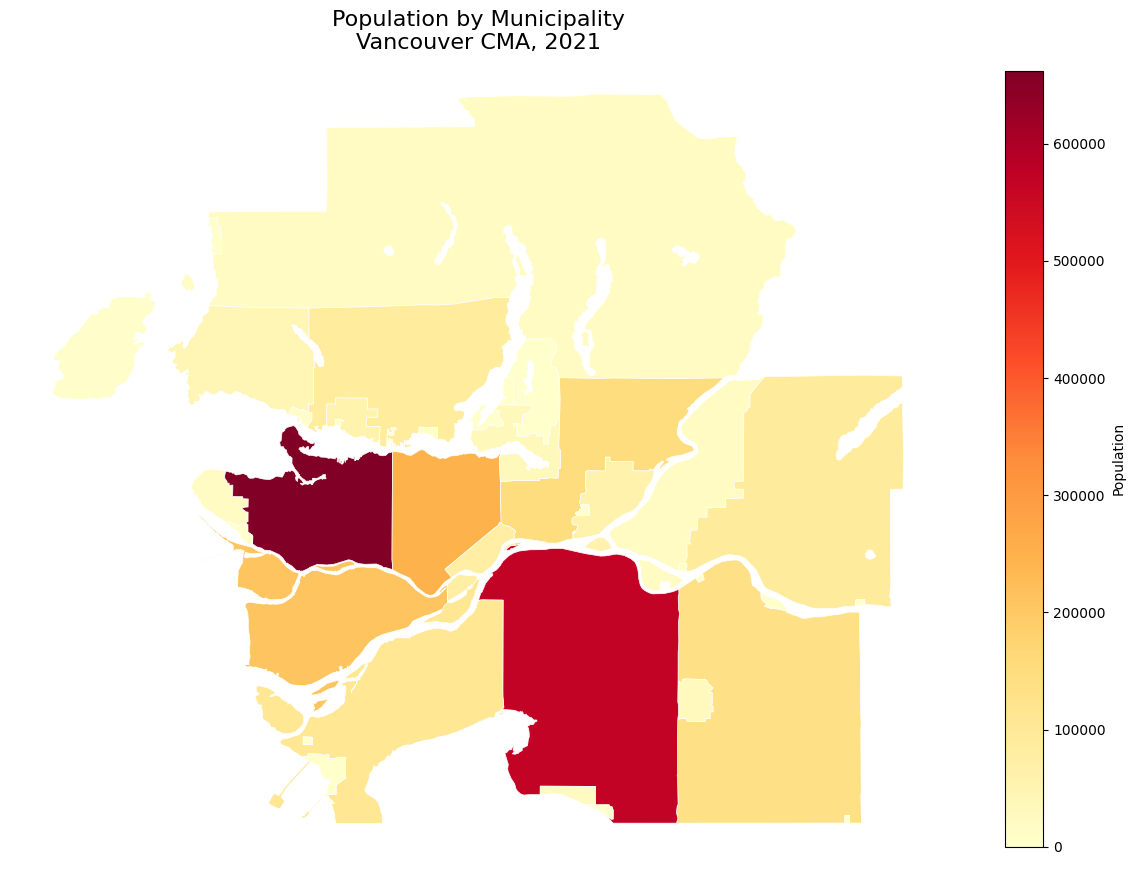
Creating Basic Maps
Let’s create our first map:
# Create a simple population map
fig, ax = plt.subplots(1, 1, figsize=(12, 10))

vancouver_data.plot(
    column='v_CA21_1',
    cmap='YlOrRd',
    legend=True,
    ax=ax,
    edgecolor='white',
    linewidth=0.5,
    legend_kwds={'label': 'Population', 'shrink': 0.8}
)

ax.set_title('Population by Municipality\nVancouver CMA, 2021', fontsize=16)
ax.axis('off')  # Remove axes for cleaner look

plt.tight_layout()
display(fig)
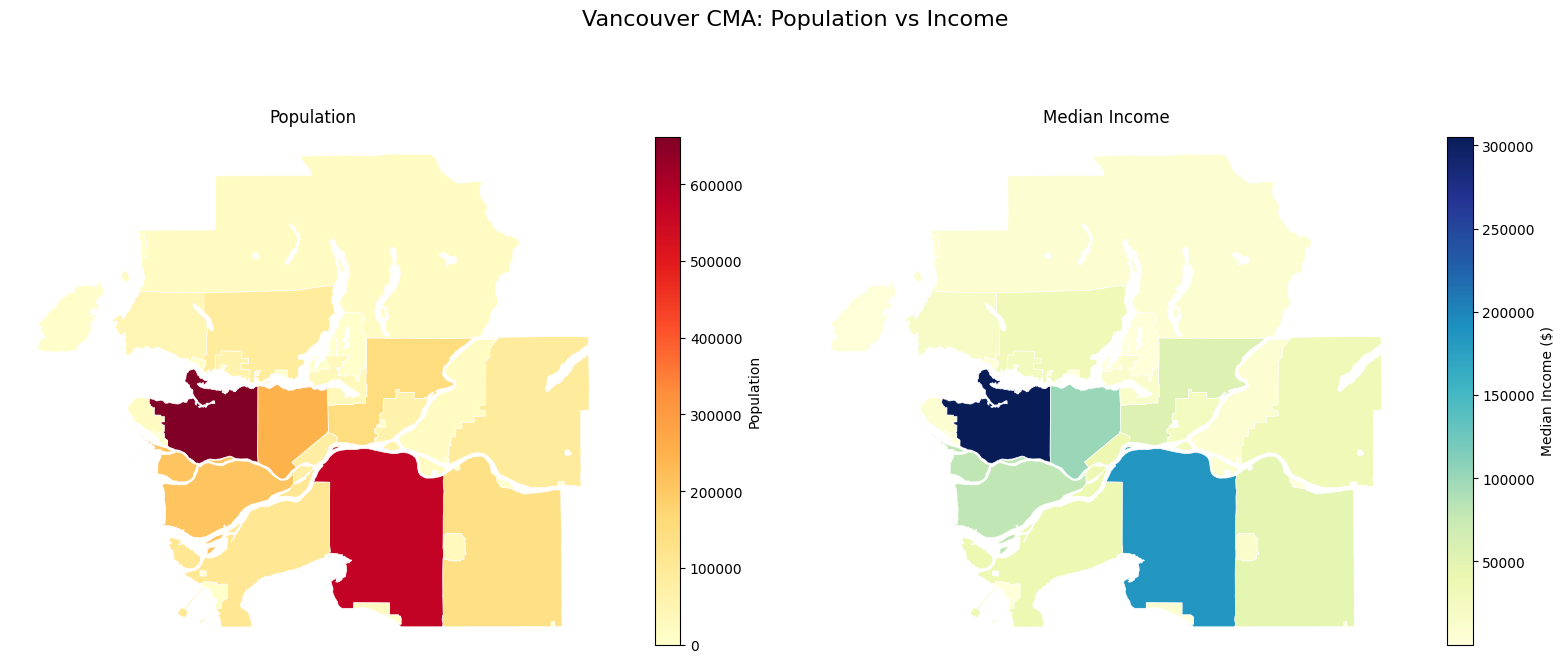
Multi-Variable Mapping
Compare two variables side by side:
fig, (ax1, ax2) = plt.subplots(1, 2, figsize=(16, 7))

# Population map
vancouver_data.plot(
    column='v_CA21_1',
    cmap='YlOrRd',
    legend=True,
    ax=ax1,
    edgecolor='white',
    linewidth=0.5,
    legend_kwds={'label': 'Population', 'shrink': 0.8}
)
ax1.set_title('Population')
ax1.axis('off')

# Income map
vancouver_data.plot(
    column='v_CA21_434',
    cmap='YlGnBu',
    legend=True,
    ax=ax2,
    edgecolor='white',
    linewidth=0.5,
    legend_kwds={'label': 'Median Income ($)', 'shrink': 0.8}
)
ax2.set_title('Median Income')
ax2.axis('off')

plt.suptitle('Vancouver CMA: Population vs Income', fontsize=16, y=1.02)
plt.tight_layout()
display(fig)
Working with Different Geographic Levels
Different levels provide different levels of detail:
try:
    # Compare data at different geographic levels
    levels = ['CMA', 'CSD', 'CT']
    level_names = ['Metro Area', 'Municipality', 'Census Tract']

    print("Data availability by geographic level:")
    print("="*45)

    for level, name in zip(levels, level_names):
        try:
            # Get count of regions at each level for Vancouver
            data = pc.get_census(
                dataset="CA21",
                regions={"CMA": "59933"},
                vectors=["v_CA21_1"],
                level=level,
                labels="short"
            )
            print(f"{name:15} ({level}): {len(data):4,} regions")
        except Exception as e:
            print(f"{name:15} ({level}): Error - {e}")

except Exception as e:
    print(f"Error comparing levels: {e}")

    # Show conceptual differences
    print("Geographic Level Detail (conceptual):")
    print("CMA  (1 region):    Entire metro area")
    print("CSD  (20+ regions): Individual cities/towns")
    print("CT   (300+ regions): Neighborhoods within cities")
    print("DA   (1000+ regions): Small areas (400-700 people)")
Data availability by geographic level:
=============================================
📋 Request Preview:
   Dataset: CA21
   Level: CMA
   Regions: 1 region(s)
   Variables: 1 vector(s)
🔍 Estimated Size: small (5 rows)
⏱️  Expected Time: < 5 seconds
🔄 Querying CensusMapper API for 1 region(s)...
📊 Retrieving 1 variable(s) at CMA level...
✅ Successfully retrieved data for 1 regions
📈 Data includes 1 vector columns
Metro Area      (CMA):    1 regions
📋 Request Preview:
   Dataset: CA21
   Level: CSD
   Regions: 1 region(s)
   Variables: 1 vector(s)
🔍 Estimated Size: small (100 rows)
⏱️  Expected Time: < 5 seconds
🔄 Querying CensusMapper API for 1 region(s)...
📊 Retrieving 1 variable(s) at CSD level...
✅ Successfully retrieved data for 38 regions
📈 Data includes 1 vector columns
Municipality    (CSD):   38 regions
📋 Request Preview:
   Dataset: CA21
   Level: CT
   Regions: 1 region(s)
   Variables: 1 vector(s)
🔍 Estimated Size: small (200 rows)
⏱️  Expected Time: < 5 seconds
🔄 Querying CensusMapper API for 1 region(s)...
📊 Retrieving 1 variable(s) at CT level...
✅ Successfully retrieved data for 535 regions
📈 Data includes 1 vector columns
Census Tract    (CT):  535 regions
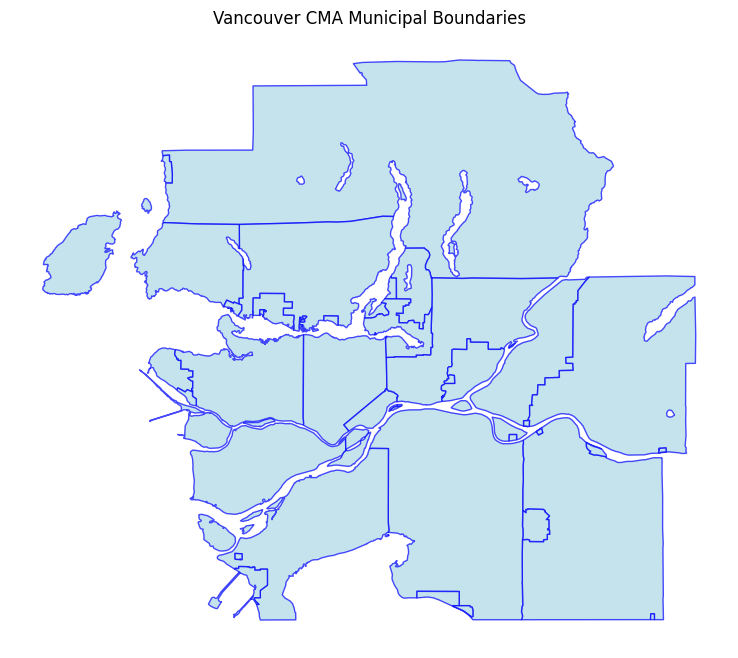
Getting Geometry Only
Sometimes you just need the boundaries without data:
try:
    # Get just the geographic boundaries
    boundaries = pc.get_census_geometry(
        dataset="CA21",
        regions={"CMA": "59933"},
        level="CSD"
    )

    print(f"Retrieved {len(boundaries)} boundary polygons")
    print(f"Columns: {list(boundaries.columns)}")

    # Plot the boundaries
    fig, ax = plt.subplots(1, 1, figsize=(10, 8))
    boundaries.plot(ax=ax, edgecolor='blue', facecolor='lightblue', alpha=0.7)
    ax.set_title('Vancouver CMA Municipal Boundaries')
    ax.axis('off')
    display(fig)

except Exception as e:
    print(f"Error getting boundaries: {e}")
    raise  # Fail if API call doesn't work - no fallbacks
📋 Request Preview:
   Dataset: CA21
   Level: CSD
   Regions: 1 region(s)
   Geography: geopandas
🔍 Estimated Size: medium (100 rows)
⏱️  Expected Time: 5-15 seconds
Reading data from cache...
Retrieved 38 boundary polygons
Columns: ['geometry', 'a', 'q', 't', 'dw', 'hh', 'id', 'pop', 'dw16', 'hh16', 'name', 'rgid', 'rpid', 'ruid', 'pop16']
Spatial Analysis
Perform basic spatial analysis with geopandas:
# Reproject to a projected CRS for accurate area calculations
# EPSG:3347 is Statistics Canada Lambert Conformal Conic - designed for Canada
vancouver_projected = vancouver_data.to_crs('EPSG:3347')

# Calculate area and population density
vancouver_projected['area_km2'] = vancouver_projected.geometry.area / 1e6  # Convert m² to km²
vancouver_projected['pop_density'] = vancouver_projected['v_CA21_1'] / vancouver_projected['area_km2']

print("Population Density Analysis:")
print("="*30)
print(f"Highest density: {vancouver_projected['pop_density'].max():.0f} people/km²")
print(f"Lowest density:  {vancouver_projected['pop_density'].min():.0f} people/km²")
print(f"Average density: {vancouver_projected['pop_density'].mean():.0f} people/km²")

# Show top 3 densest areas
densest = vancouver_projected.nlargest(3, 'pop_density')[['name', 'pop_density']]
print(f"\nTop 3 densest municipalities:")
for idx, row in densest.iterrows():
    print(f"  {row['name']}: {row['pop_density']:.0f} people/km²")
Population Density Analysis:
==============================
Highest density: 5745 people/km²
Lowest density:  0 people/km²
Average density: 1313 people/km²

Top 3 densest municipalities:
  Vancouver (CY): 5745 people/km²
  New Westminster (CY): 5098 people/km²
  North Vancouver (CY): 4912 people/km²
Coordinate Reference Systems
Understanding and working with projections:
print("Working with Coordinate Reference Systems:")
print("="*45)
print(f"Original CRS: {vancouver_data.crs}")
print(f"Projected CRS: {vancouver_projected.crs}")

print(f"\nCommon CRS options for Canadian data:")
print("• EPSG:4326 - WGS84 (geographic, degrees)")
print("• EPSG:3347 - Statistics Canada Lambert (Canada-wide)")
print("• EPSG:3157 - NAD83 UTM Zone 10N (BC, Western Canada)")

# Example: Convert back to geographic for web mapping
vancouver_geo = vancouver_projected.to_crs('EPSG:4326')
print(f"\nConverted back to geographic: {vancouver_geo.crs}")
Working with Coordinate Reference Systems:
=============================================
Original CRS: EPSG:4326
Projected CRS: EPSG:3347

Common CRS options for Canadian data:
• EPSG:4326 - WGS84 (geographic, degrees)
• EPSG:3347 - Statistics Canada Lambert (Canada-wide)
• EPSG:3157 - NAD83 UTM Zone 10N (BC, Western Canada)

Converted back to geographic: EPSG:4326
Exporting Geographic Data
Save your data for use in other applications:
# Export to various formats
try:
    # Prepare clean data for export (use original geographic CRS)
    export_data = vancouver_data[['geometry', 'name', 'v_CA21_1', 'v_CA21_434']].copy()

    # GeoJSON (web-friendly, supports long column names)
    export_data.to_file("vancouver_census.geojson", driver="GeoJSON")
    print("✓ Exported to GeoJSON")

    # Shapefile (GIS standard, has column name limitations)
    # Rename columns to be shapefile-friendly (10 char max)
    shp_data = export_data.rename(columns={
        'v_CA21_1': 'pop2021',
        'v_CA21_434': 'income'
    })
    shp_data.to_file("vancouver_census.shp")
    print("✓ Exported to Shapefile")

    # CSV with geometry as WKT (for Excel/analysis)
    csv_export = export_data.copy()
    csv_export['geometry_wkt'] = csv_export.geometry.to_wkt()
    csv_export.drop('geometry', axis=1).to_csv("vancouver_census.csv", index=False)
    print("✓ Exported to CSV")

except Exception as e:
    print(f"Export example: {e}")
    print("Note: Supported formats include GeoJSON, Shapefile, KML, GeoPackage")
✓ Exported to GeoJSON
✓ Exported to Shapefile
✓ Exported to CSV
Interactive Maps with Folium
Create interactive web maps:
try:
    import folium

    # Create interactive map
    center_lat = vancouver_data.geometry.centroid.y.mean()
    center_lon = vancouver_data.geometry.centroid.x.mean()

    m = folium.Map(
        location=[center_lat, center_lon],
        zoom_start=10,
        tiles='OpenStreetMap'
    )

    # Add choropleth layer
    folium.Choropleth(
        geo_data=vancouver_data,
        data=vancouver_data,
        columns=['GeoUID', 'v_CA21_1'],
        key_on='feature.properties.GeoUID',
        fill_color='YlOrRd',
        fill_opacity=0.7,
        line_opacity=0.2,
        legend_name='Population'
    ).add_to(m)

    print("Interactive map created successfully!")
    print("(In a Jupyter notebook, the map would display here)")

except ImportError:
    print("Folium not installed. Install with: pip install folium")
except Exception as e:
    print(f"Error creating interactive map: {e}")
Error creating interactive map: "None of ['GeoUID'] are in the columns"
/tmp/ipykernel_734/3122821041.py:5: UserWarning: Geometry is in a geographic CRS. Results from 'centroid' are likely incorrect. Use 'GeoSeries.to_crs()' to re-project geometries to a projected CRS before this operation.

  center_lat = vancouver_data.geometry.centroid.y.mean()
/tmp/ipykernel_734/3122821041.py:6: UserWarning: Geometry is in a geographic CRS. Results from 'centroid' are likely incorrect. Use 'GeoSeries.to_crs()' to re-project geometries to a projected CRS before this operation.

  center_lon = vancouver_data.geometry.centroid.x.mean()
Best Practices
Performance Tips
print("Performance Best Practices:")
print("="*30)
print("1. Use appropriate geographic levels:")
print("   • CMA/CA for regional analysis")
print("   • CSD for municipal comparisons")
print("   • CT for neighborhood analysis")
print("   • DA for detailed local analysis")
print("\n2. Cache your data:")
print("   • pycancensus caches API responses automatically")
print("   • Save processed results to avoid re-computation")
print("\n3. Choose the right CRS:")
print("   • EPSG:4326 (WGS84) for web mapping")
print("   • EPSG:3347 (Stats Can Lambert) for Canada analysis")
print("   • Local UTM zones for precise measurements")
Performance Best Practices:
==============================
1. Use appropriate geographic levels:
   • CMA/CA for regional analysis
   • CSD for municipal comparisons
   • CT for neighborhood analysis
   • DA for detailed local analysis

2. Cache your data:
   • pycancensus caches API responses automatically
   • Save processed results to avoid re-computation

3. Choose the right CRS:
   • EPSG:4326 (WGS84) for web mapping
   • EPSG:3347 (Stats Can Lambert) for Canada analysis
   • Local UTM zones for precise measurements
Data Quality
print("Data Quality Checks:")
print("="*20)

# Check for missing geometries
null_geom = vancouver_data.geometry.isnull().sum()
print(f"Missing geometries: {null_geom}")

# Check for invalid geometries
invalid_geom = (~vancouver_data.geometry.is_valid).sum()
print(f"Invalid geometries: {invalid_geom}")

# Check data completeness
null_pop = vancouver_data['v_CA21_1'].isnull().sum()
print(f"Missing population data: {null_pop}")

# Basic statistics
print(f"\nData summary:")
print(f"Total regions: {len(vancouver_data)}")
print(f"Total population: {vancouver_data['v_CA21_1'].sum():,}")
print(f"Average income: ${vancouver_data['v_CA21_434'].mean():,.0f}")
Data Quality Checks:
====================
Missing geometries: 0
Invalid geometries: 0
Missing population data: 1

Data summary:
Total regions: 38
Total population: 2,642,825.0
Average income: $31,615
Summary
This tutorial covered the essential aspects of working with geographic census data:
Key Skills Learned:
Retrieving census data with geographic boundaries
Understanding Canadian census geographic levels
Creating choropleth maps with matplotlib
Performing basic spatial analysis
Working with coordinate reference systems
Exporting data to various formats
Creating interactive maps
Next Steps:
Try different census datasets (CA16, CA11, etc.)
Explore temporal analysis by comparing multiple census years
Combine with other geospatial data sources
Use advanced spatial analysis tools from PySAL or similar libraries
Create web applications with your maps using Streamlit or Dash
Additional Resources:
Geopandas Documentation: Comprehensive spatial data analysis
Folium Documentation: Interactive web mapping
Matplotlib Cartopy: Advanced cartographic projections
CensusMapper: Web interface for exploring census data
Statistics Canada: Official census documentation